Dunia ICT

Mengenali ICT dengan lebih dekat.

Download Soalan ICT

Memuat Turun soalan-soalan ICT disini.

Download Nota-nota ICT

Memuat Turun nota-nota ICT.

Sejarah Komputer

Mari kita berkenalan dengan nenek dan atok komputer

Tip-tip penggunaan Komputer

Untuk anda untuk kamu.. tip2 yang ader dalam fikiran ku

Showing posts with label Nota ICT "English". Show all posts

Wednesday, 2 March 2011

SECURITY PROCEDURES

SECURITY PROCEDURES

Computers should have alarm systems to guard them from any attacks such as viruses and data corruption. The alarm system is the security measures that we take to ensure its safety.

DATA PROTECTION

We need to protect the data in the computer as it may somehow get lost or corrupted due to some viruses or mishap like fire, flood, lightning, machine failures and even human errors.

There are a few ways to protect the information namely:
• make backup files
• detect the virus and clean the computer
• warn others on virus attacks

1) BACKUP FILES
Users can do backups of file systems by:

- keeping the duplicated files in external storage such as in the floppy disk and thumb drive
- do backup frequently

2) DETECT VIRUS AND DO CLEANUP
A computer virus is able to affect and infect the way the computer works. Viruses can be detected when we run an antivirus. We can also delete the infected files and documents.

3) WARN OTHERS ON VIRUS ATTACK
We can warn others on virus attacks or new viruses by sending e-mails to them.

DETECTING ILLEGAL ACCESS TO SYSTEMS

The computer system is able to detect any illegal access to the system by a user who does not have any authorisation. Basically, a corporation will simply use tcpwrappers and tripwire to detect any illegal access to their system. User's access will be reviewed periodically by computer operations. On going internal audits will be made to ensure detection of violations of security and unauthorised modifications to software and data .

TCPWRAPPERS
Tcpwrappers will control access at the application level, rather than at the socket level like iptables and ipchains. The system will run tcpwrappers to log access to ftp, tftp, rch, rlogin, rexec and telnet.

TRIPWIRE
Tripwire will detect and report on any changes in the thousands of strategic system files.
The system will run tripwire to determine if system files have changed.

PREVENTING ILLEGAL ACCESS TO SYSTEMS
Ways to prevent illegal access to systems:
1. Run anlpassword to make password cracking difficult.
2. Run tcpwrappers to check if the name for an ip address can be provided by DNC
3. Use a callback system to prevent unauthorised use of stolen passwords.

PREVENTING ILLEGAL ROOT ACCESS

Sudo stands for (Superuser do) and is a program in Unix, Linux and similar operating systems such as Mac OS X that allows users to run programs in the form of another user (normally in the form of the system's superuser).

Sudo allows a permitted user to execute a command as the superuser or another user, as specified in the sudoers file.

PATCH
Patch supplies small updates to software, provided that the source code is available.
Patch is a name of an UNIX utility. It applies a script generated by the different program to a set of files that allows changes from one file to be directly applied to another file.

Resources are not enough to patch all security holes that we hear about through the bugtraq list.

RELATIONSHIP BETWEEN SECURITY THREATS AND SECURITY MEASURES

SECURITY THREADS
Security threats may come from in many forms. For example, when someone is invading your account information from a trusted bank, this act is considered as a security threat.

Security measures can be used to prevent this invader from getting the account information. For example, the bank can use a firewall to prevent
unauthorised access to its database.

MALICIOUS CODE THREATS VS. ANTIVIRUS AND ANTI-SPYWARE
Security threats include virus, Trojan horse, logic bomb, trapdoor and backdoor, and worm.

Antivirus and anti-spyware can be used to protect the computer from the threats by:
limiting connectivity
allowing only authorised media for loading data and software
enforcing mandatory access controls
blocking the virus from the computer program

HACKING VS. FIREWALL
Hacking is an unauthorised access to the computer system done by a hacker. We can use firewall or cryptography to prevent the hacker from accessing our computers.

A firewall permits limited access to unauthorised users or any activities from the network environment. Cryptography is a process of hiding information by changing the actual information into different representation, for example, an APA can be written as 7&*.


NATURAL DISASTER VS. DATA BACKUP
The natural and environmental disasters may include:
• flood
• fire
• earthquakes
• storms
• tornados

The backup system is needed to backup all data and applications in the computer. With the backup system, data can be recovered in case of an emergency.

THEFT VS. HUMAN ASPECTS
Computer theft can be of two kinds:
  • can be used to steal money, goods, information and computer resources
  • the actual stealing of computers, especially notebooks and PDAs
Measures that can be taken to prevent theft:
  • prevent access by using locks, smart-card or password
  • prevent portability by restricting the hardware from being moved
  • detect and guard all exits and record any hardware transported
BE SUPSPICIOUS OF ALL RESULTS

There are many instances where non-programmers develop applications which are not built with proper understanding of software engineering practices. Data produced by such applications may not be correct and may risk corrupting data received from other sources that are not compatible with the application.

SECURITY MEASURES


Security measures mean the precautionary measures taken toward possible danger or damage. There are 6 type of security measures.

1) DATA BACKUP
Data Backup is a program of file duplication. Backups of data applications are necessary so that they can be recovered in case of an emergency.

2) CRYPTOGRAPHY

Cryptography is a process of hiding information by altering the actual information into different representation, for example, an APA can be written as I? X.

Almost all cryptosystems depend on a key such as a password like the numbers or a phrase that can be used to encrypt or decrypt a message.

The traditional type of cryptosystem used on a computer network is called a symmetric secret key system.

3) ANTIVIRUS
An antivirus program protects a computer against viruses by identifying and removing any computer viruses found in the computer memory, on storage media or incoming e-mail files. An antivirus program scans for programs that attempt to modify the boot program, the operating system and other programs that normally are read from but not modified.

IDENTIFYING VIRUS
Two technique are used to identify the virus.
----------------------------------------------------------------
If an antivirus program identifies an infected file, it attempts to remove its virus, worm or Trojan horse. If the antivirus program cannot remove the infection, it often quarantines the infected file. Quarantine is a separate area of a hard disk that holds the infected file until the infection can be removed. This step ensures other files will not become infected. Patents for inventions Utility, design or plant patents that protect inventions and improvements to existing inventions
-----------------------------------------------------------------
4) ANTI-SPYWARE
Spyware is a program placed on a computer without the user’s knowledge. It secretly collects information about the user.

The spyware program communicates information to the outside source.

An anti-spyware application program sometime called tracking software or a spybot is used to remove spyware.

Among of the popular anti-spyware programs are:
• Spybot Search and Destroy
• Ad-aware
• Spyware Blaster

5) FIREWALL
Firewall is a piece of hardware or software which functions in a networked environment to prevent some communications forbidden by the security policy.

Firewall implement a security policy. It might permit limited access from in or outside the network perimeters or from certain user or for certain activities.

6) HUMAN ASPECTS OF SECURITY MEASURES
Human aspects refer to the user and also the intruder of a computer system.
It is one of the hardest aspects to give protection to.

The most common problem is the lack of achieving a good information security procedure

Tuesday, 22 February 2011

INTRODUCTION COMPUTER THREATS


The computer is a great tool to store important information. In certain cases, the information is very vital that losing it will harm the computer system.

Computer threats can come from many ways either from human or natural disasters. For example, when someone is stealing your account information from a trusted bank, this threat is considered as a human threat. However, when your computer is soaked in heavy rain, then that is a natural disaster threat.

MALICIOUS CODE
Malicious code is also known as a rogue program. It is a threat to computing assets by causing undesired effects in the programmer’s part. The effect is caused by an agent, with the intention to cause damage.

The agent for malicious code is the writer of the code, or any person who causes its distribution. There are various kinds of malicious code. They include virus, Trojan horse, logic door, trapdoor and backdoor, worm and many others.

a) VIRUS
• a program that can pass on the malicious code to other programs by modifying them
• attaches itself to the program, usually files with .doc, .xls and .exe extensions
• destroys or co-exists with the program
• can overtake the entire computing system and spread to other systems

b) TROJAN HORSE
• a program which can perform useful and unexpected action
• must be installed by users or intruders before it can affect the system’s assets
• an example of a Trojan horse is the login script that requests for users’ login ID and password
• the information is then used for malicious purposes
c) LOGIC BOMB
• logic bomb is a malicious code that goes off when a specific condition occurs.
• an example of a logic bomb is the time bomb
• it goes off and causes threats at a specified time or date

e) TRAPDOOR OR BACKDOOR
• a feature in a program that allows someone to access the program with special privileges

f) WORM
• a program that copies and spreads itself through a network

" Primary Differences Between Worms VS viruses "

Worm Virus
Operates through the network Spreads through any medium.
Spreads copies of itself as a standalone program Spreads copies of itself as a program that attaches to other programs

HACKER

Hacking is a source of threat to security in computer. It is defined as unauthorised access to the computer system by a hacker. Hackers are persons who learn about the computer system in detail. They write program referred to as hacks. Hackers may use a modem or cable to hack the targeted computers.

NATURAL AND ENVIRONMENTAL THREATS
Computers are also threatened by natural or environmental disaster. Be it at home, stores, offices and also automobiles.Examples of natural and environmental disasters:
  1. Flood
  2. Fire
  3. Earthquakes, storms and tornados
  4. Excessive Heat
  5. Inadequate Power Supply

THEFT
Two types of computer theft:
  1. Computer is used to steal money, goods, information and resources.
  2. Stealing of computer, especially notebook and PDAs.
Three approaches to prevent theft:
  1. prevent access by using locks, smart-card or password
  2. prevent portability by restricting the hardware from being moved
  3. detect and guard all exits and record any hardware transported

DEFINITION OF COMPUTER SECURITY

DEFINITION OF COMPUTER SECURITY

Computer security means protecting our computer systems and the information they contain against unwanted access, damage, destruction or modification.
We need to protect our computer from any intruders such as hackers, crackers and script kiddie.

We do not want strangers to read our e-mail, use our computer to attack other systems, send forged e-mail from our computer, or examine personal information stored on our computer such as financial statements.

COMPUTER CRIMES

COMPUTER CRIMES
A computer crime is defined as any criminal activity that is related to the use of computers. These activities include computer fraud, copyright infringement, computer theft and computer attack.

COMPUTER FRAUD


Computer fraud is the crime obtaining money by deceiving people through the use of computers.There are many forms of computer frauds which include:-
  1. e-mail hoaxes(an attempt to make people believe something that is not true)
  2. Program fraud
  3. investment schemes
  4. sales promotions
  5. claim of expertise on certain fields

COPYRIGHT INFRINGEMENT


Copyright infringement is defined as a violation of the rights secured by a copyright. Copyright infringement involves illegal copy or reproduction of copyrights material by the black market group. The open commercial sale of pirated item is also illegal.
Copyright is the legal right to be only producer or seller of book,song and film - Selling pirates software.

COMPUTER THEFT


Computer theft is defined as the unauthorized use of another person’s property with the intention to deny the owner the rightful possession of that property or its use.
Examples of computer theft include:
  1. transfer of payments to the wrong accounts
  2. tap into data transmission lines on database at no cost
  3. divert goods to the wrong destination

COMPUTER ATTACK


Computer attack may be defined as any activities taken to disrupt the equipment of computer systems, change processing control or corrupt stored data.
Computer attack can be in the forms of:
  1. physical attack that disrupt the computer facility or its transmission lines.
  2. an electronic attack that uses the power of electromagnetic energy to overload computer circuitry.
  3. a computer network attack that uses a malicious code to exploit a weakness in software, or in the computer security practices of a computer user

Monday, 21 February 2011

CYBER LAW


CYBER LAW

What is Cyber Law?

Cyber law refers to any laws relating to protecting the Internet and other online communication technologies.

Why Need For Cyber Law?
  1. Almost all companies extensitively depend upon their computer network and keep their valuable data in electronoc form.
  2. Goverment forms including income tax return, company law forms etc are now filled in electronic form.
  3. Most people are using email, cell phones and SMS messages for communication.

These concerns and issues clearly indicate why cyber laws are needed in online activities.

THE CYBER LAW ACTS IN MALAYSIA
The Malaysian Government has already passed several cyber laws to control and reduce the Internet abuse. These cyber laws include:
  1. Digital Signature Act 1997
  2. Computer Crimes Act 1997
  3. Telemedicine Act 1997
  4. Communications and Multimedia Act 1998

DIGITAL SIGNATURE ACT 1997
The Digital Signature Act 1997 secures electronic communications especially on the Internet. Digital Signature is an identity verification standard that uses encryption techniques to protect against e-mail forgery. The encrypted code consists of the user’s name and a hash of all the parts of the message.

COMPUTER CRIMES ACT 1997
The Computer Crimes Act 1997 gives protection against the misuses of computers and computer criminal activities such as unauthorised use of programmes, illegal transmission of data or messages over computers and hacking and cracking of computer systems and networks. By implementing the Computer Crimes Act 1997, users can protect their rights to privacy and build trust in the computer system. At the same time, the government can have control at a certain level over cyberspace to reduce cyber crime activities.

TELEMEDICINE ACT 1997
The Telemedicine Act 1997 ensures that only qualified medical practitioners can practice telemedicine and that their patient's rights and interests are protected.These act provides the future development and delivery of healthcare in Malaysia.

COMMUNICATIONS AND MULTIMEDIA ACT 1998
The implementation of Communication and Telecommunication Act 1998 ensures that information is secure, the network is reliable and the service is affordable all over Malaysia.
This Act also ensures high level of user's confidence in the information and communication technology industry.

THE PROCESS OF INTERNET FILTERING


INTERNET FILTERING

It is our responsibility to ensure that the teenagers are protected from these corruptions of the mind by filtering access to the Internet.Internet filtering is a process that prevents or blocks access to certain materials on the Internet.

It is our responsibility to ensure that the teenagers are protected from these corruptions of the mind by filtering access to the Internet.

What is Internet filtering?

Internet filtering is a process that prevents or blocks access to certain materials on the Internet. Filtering is most commonly used to prevent children from accessing inappropriate material and to keep employees productive on the Internet.

CONTROLLING ACCESS TO THE INTERNET

The current preferred method of choice to limit access on the Internet is to filter content either by:

  • keyword blocking
  • site blocking
  • web rating systems

These methods require software to be installed at a client of server level.

KEYWORD BLOCKING

One of the strategies is by using the keyword blocking method. This method uses a list of banned words or objectionable terms.

As the page is downloading, the filter searches for any of these words. If found, it will block the page completely, stop downloading the page, block the banned words and even shut down the browser.

SITE BLOCKING

  • software company maintains a list of ‘dubious Internet sites’
  • the software prevents access to any sites on this list
  • ‘denial lists’ regularly updated
  • some software provides control over what categories of information you block
  • Who decides what goes on the ‘denial list’ and what criteria are they using?
  • can you keep track of the whole of the Internet?
  • filters can use both site blocking and word blocking

WEB RATING SYSTEMS

Web sites are rated in terms of nudity, sex, violence and language. The Recreational Software Advisory Council (RSACI) is responsible for the rating of the websites on the content on the internet.

  • ratings done either by the web page author or by the independent bureau.
  • browsers set to only accept pages with certain levels of ratings.

CONTROVERSIAL CONTENT


CONTROVERSIAL CONTENT

A controversial content is information that causes disagreement in opinions and may cause the disruption of peace because different people or culture will have different views


ISSUES ON CONTROVERSIAL CONTENTS

The issues on controversial contents are always focusing on pornography and slander. Malaysia considers pornography and slander as illegal.

Pornography Creative activity (writing or pictures or films etc.) of no literary or artistic value other than to stimulate sexual desire.

Slander Oral communication of false statements injurious to a person's reputation.
A false and malicious statement or report about someone.

DEFINITION OF PORNOGRAPHY

The definition of pornography is any form of media or material (like books or photographs) that depicts erotic behaviour and is intended to cause sexual excitement.

Pornography tends to exploit men, women and children in a distasteful manner.

SLANDER

Slander is another example of controversial content.

Slander is a legal term for false and malicious statement (meaning knowing that it is false, or “reckless disregard” that it was false) about someone.

Examples :
You wrote an e-mail that a fellow classmate was having an affair with a teacher, even though it was not true. You then sent it to five other friends.


IMPACTS ON MALAYSIAN SOCIETY

Pornography
• can lead to criminal acts such as exploitation of women and children
• can lead to sexual addiction or perversion
• can develop low moral value towards other men, women or children
• can erode good religious, cultural and social beliefs and behaviour

Slander
• can develop into a society that disregards honesty and truth
• can develop bad habit of spreading untruths and rumours
• can lead to unnecessary argument
• can cause people to have negative attitudes towards another person

VERIFICATION


VERIFICATION
Verification is the act of proving or disproving the correctness of a system with respect to a certain formal specification.

METHODS OF VERIFICATION

There are two methods commonly used in verification, which are user identification and processed object.
User identification refers to the process of validating the user. Processed object refers to something the user has such as identification card, security token and cell phone.

USER IDENTIFICATION

The examples of validating process using the user identification are:
  • Key in the user name to log-in to a system and the system will verify whether the user is valid or invalid user
  • Show the exam slip to verify that you are the valid candidate for the exam.
  • show a passport before departure.

Wednesday, 16 February 2011

AUTHENTICATIONS


AUTHENTICATIONS

Authentication is a process where users verify that they are who they say they are. The user who attempts to perform functions in a system is in fact the user who is authorised to do so.

For Example : When you use an ATM card, the machine will verify the validation of the card then the machine will request for a pin number. This is where the authentication process takes place.

METHODS OF AUTHENTICATION

There are two commonly used authentication methods, which are biometric device and callback system.

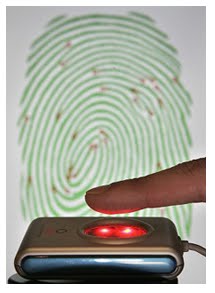
Biometric device is a device that translates personal characteristics into a digital code that is compared with a digital code stored in the database.

Callback system refers to the checking system that authenticates the user.

BIOMETRIC DEVICES

Fingerprint Recognition

In order to prevent fake fingers from being used, many biometrics fingerprint systems also measure blood flow, or check for correctly arrayed ridges at the edges of the fingers.

Facial Recognition

Facial recognition analyses the characteristics of an individual's face images captured Through a digital video camera. Facial recognition is widely used, touted as a fantastic system for recognizing potential threats

(whether terrorists, scam artists, or known criminals).

Hand Geometry Scanning

Hand scanning involves the measurement and analysis of the shape of one's hand.

Unlike fingerprints, the human hand isn't unique. Individual hand features are not descriptive enough for identification.

It is possible to devise a method by combining various individual features and measurements of fingers and hands for verification purposes.

Iris Scanning

Iris scanning analyses the features that exist in the colored tissues surrounding the pupil which has more than 200 points that can be used for comparison, including rings, furrows and freckles.

The scans use a regular video camera and can be done from further away than a retinal scan. It will work perfectly fine through glasses and in fact has the ability to create an accurate enough measurement that it can be used for identification purposes.

The accuracy of this method is excellent while the cost involved is high.

Retinal Scanning

Retinal biometrics involves the scanning of retina and analyzing the layer of blood vessels at the back of the eye.

Retinal scanning involves using a low-intensity light source and an optical coupler and can read the patterns at a great level of accuracy.

Retina scanning requires the user to remove glasses, place their eye close to the device, and focus on a certain point. Whether the accuracy can outweigh the public discomfort is yet to be seen.

The accuracy in retinal scanning is very good and the cost involved is fair.

Voice Recognition

Voice recognition system compares a person’s live speech with their stored voice pattern.

Voice recognition biometrics requires user to speak into a microphone. What he speaks can be his password or an access phrase.

Verification time is approximately 5 seconds. To prevent recorded voice

use, most voice recognition devices require the high and low frequencies of the sound to match, which is difficult for many recording instruments to recreate well. Also, some devices generate random number of sequences for verification.

The accuracy in voice recognition is fair and the cost involved is very reasonable.

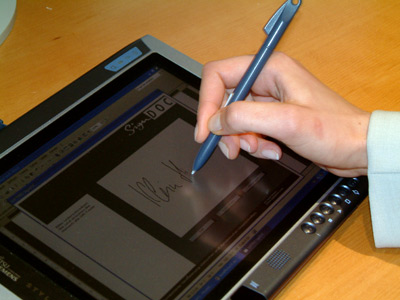
Signature Verification System

Signature verification system uses special pen and tablet. After pre-processing the signature, several features are extracted.

The authenticity of a writer is determined by comparing an input signature to a stored reference set (template) consisting of three signatures.

The similarity between an input signature and the reference set is computed using string matching and the similarity value is compared to a threshold.

The accuracy in signature verification system is fair and the cost involved is excellent.

CALLBACK SYSTEM

The callback system is commonly used in the bank operation and business transaction.

For example, when you book for the taxi service, the operator will ask you to hang up and she will call you back to confirm for the service required.

WHY IS AUTHENTICATION IMPORTANT?

Authentication is important in order to safeguard against the unauthorized access and use.

PRIVACY IN COMPUTER USAGE

WHAT IS PRIVACY?

Privacy in IT refers to data and information privacy.

Data refers to a collection of raw unprocessed facts, figures and symbols. Then, computer is used to process data into information. In general, data include texts, numbers, sounds, images and video.

Information privacy is described as the rights of individuals and companies to deny or restrict the collection and use of information about them.

WAYS COMPUTER TECHNOLOGY THREATEN OUR PRIVACY

Every time you click on an advertisement or register a software product online, your Information is entered into a database. Computer technology can also threaten privacy through spam. Do you know what spam is? Spam is unsolicited e-mail messages, advertisements or newsgroup postings sent to many recipients at once.

How does computer technology threaten the privacy of our data? It is done through:

Cookies

Electronic profile

Spy ware

Computer technology threatens our privacy through electronic profiling. For example, when we fill out a form such as a magazine subscription, purchasing products or contest entry form on the Internet, this data is kept in the database. It will include age, address, marital status and other personal details.

Cookies

  • are used to identify users by web casting, e-commerce and other web applications
  • contain user information and are saved in the computer hard disk
  • are used by some websites to store passwords and track how regularly we visit a website, that’s how we become potential targets for web advertisers
  • enable web sites to collect information about your online activities and store them for future use, then the collected details will be sold to any company that requests for it.

Electronic profile
  • electronic profile is the combining of data in a database that can be sold to the Internet by the company to the interested parties.
  • this database is in a form such as magazine subscription or product warranty cards that had been filled by online subscribers.
  • the information in electronic profile includes personal details such as your age, address and marital status.

Spyware

  • refers to a program that collects user information without the user’s knowledge.
  • can enter computers, sneaking in like a virus.
  • is a result of installing new programs.
  • communicates information it collects to some outside source while we are online.

WHY DO WE NEED PRIVACY?

We need privacy for anonymity. For example, the Internet creates an elaborate trail of data detailing a person surfing on the Web because all information is stored inside cookies. We do not want our trail to be detected.

We also need privacy for confidentiality. For example, online information generated in the course of a business transaction is routinely used for a variety of other purposes without the individual’s knowledge or consent.

We do not want our private lives and habits exposed to third parties.

CAN PRIVACY BE PROTECTED?

Privacy can be protected by:

(a) Privacy law

The privacy laws in Malaysia emphasizes on the following:

Security Services to review the security policy

Security Management to protect the resources

Security Mechanism to implement the required security services

Security Objects, the important entities within the system environment

(b) Utilities software

Example: anti-spam program, firewall, anti-spyware and antivirus.

INTELLECTUAL PROPERTY RIGHTS

DEFINITION OF INTELLECTUAL PROPERTY

Intellectual Property refers to works created by inventors, authors and artists. These works are unique and have value in the market place. In our daily lives, we are surrounded by things that are protected by IP. Your school bags, your shoes and even your socks are protected by Intellectual Property rights. Nike, Bata or Adidas, for example, are all protected by a group of legal rights.

INTELLECTUAL PROPERTY LAW

Intellectual Property laws cover ideas, inventions, literary creations, unique names, business models, industrial processes, computer program codes and more.

INVENTIONS PROTECTED BY INTELLECTUAL PROPERTY LAWS

As businesses continue to expand globally, business owners must realise the importance of getting professional advice on how to establish and safeguard their intellectual property rights. These include :

Trademarks

Service marks

Trade/company names

Domain names

Geographical indications

Copyrights

Patents

Example : Protected by property law.

INTELLECTUAL PROPERTY PROTECTION

There are four types of Intellectual Property protection. They are patents for invention, trademarks for brand identity, designs for product appearance and copyright for material.

Patents for inventions

Trademarks for brand identity

Design for product appearance

Copyright for material

Patents for inventions

Utility, design or plant patents that protect inventions and improvements to

existing inventions

Trademarks for brand identity

Words, names, symbols, devices and images that represent products, goods or services.

Design for product appearance

Literary and artistic material, music, films, sound recordings and road casts,

including software and multimedia.

Copyright for material

The features of, in particular, the lines, contours, colors, shape, texture or material of the product itself or its ornamentation.

THE DIFFERENCES BETWEEN ETHICS AND LAW

DEFINITION OF ETHICS

In general, ethics is a moral philosophy where a person makes a specific moral choice and sticks to it. On the other hand, ethics in computing means moral guidelines to refer to when using the computer and computer networks. This includes the Internet.

DEFINITION OF LAW

Law is a legal system comprising of rules and principles that govern the affairs of a community and controlled by a political authority. Law differs from one country to another. In the era of technology, computer law is needed to clarify goods or actions that fall under the computer law. Computer law refers to all areas in law that requires an understanding of computer technology such as hardware, software and Internet. Examples of laws of computing in Malaysia include the Malaysian Communication and Multimedia Act, the Computer Crime Act 1997 and the Telemedicine Act 1997.

WHY DO WE NEED ETHICS AND LAW IN COMPUTING?

Respecting Ownership

Respecting Privacy

Respecting Property

RESPECTING OWNERSHIP

We must respect ownership by not stealing other people’s work either by duplicating or distributing it. Duplicating and distributing copies of audio tapes, video tapes and computer programs without permission and authorization from the individual or company that created the program are immoral and illegal.

RESPECTING PRIVACY AND CONFIDENTIALITY

We should respect other people's privacy and confidentiality by refraining ourselves from reading their mails or files without their permission. If we do so, it is considered as violating an individual’s rights to privacy and confidentiality.

RESPECTING PROPERTY

Property here means ownership. Since an individual data and information are considered as property, therefore, an act of tampering and changing electronic information is considered as vandalism and disrespect for other people’s property.

SIMILARITIES BETWEEN ETHICS AND LAW

Both ethics and law are complimentary to each other and are made:

to guide user from misusing computers

to create a healthy computer society, so that computers are used to contribute to a better life

to prevent any crime

DIFFERENCES BETWEEN ETHICS AND LAWS

ETHICS

GUIDELINE - As a guideline to computer users.

MORAL STANDARDS - Ethical behavior is judged by moral standards.

FREE TO FOLLOW - Computer users are free to follow or ignore the code of ethics.

NO PUNISHMENTS - No punishment for anyone who violates ethics.

UNIVERSALS - Universal, can be applied anywhere, all over the world.

PRODUCE ETHICAL COMPUTER USERS - To produce ethical computer users.

IMMORAL - Not honoring computer ethics means ignoring the moral elements (immoral).

LAW

CONTROL - As a rule to control computer users.

JUDICIAL STANDARDS - Law is judged by judicial standards.

MUST FOLLOW - Computer users must follow the regulations and law.

PENALTIES, IMPRISONMENTS AND OTHER PUNISHMENTS - Penalties, imprisonments and other punishments for those who break the law.

DEPENDS ON COUNTRY - Depends on country and state where the crime is committed.

PREVENT MISUSING OF COMPUTERS - To prevent misuse of computers.

CRIME - Not honoring the law means committing a crime.


UNETHICAL VS. LAW BREAKING CONDUCTS

Unethical:

  1. using the office computer to do personal things
  2. reading your friend’s e-mail without his or her permission
  3. plagiarising and using materials from the Internet for your class assignment without giving credit to the original author

Law breaking:

  1. sending a computer virus via e-mail
  2. hacking into your school’s database to change your examination results.
  3. selling pirated software in a night market

COMPUTER ETHICS

ETHICS IN GENERAL

A guideline is needed to stop the current technology products from being exploited for example replicating original CD and selling them as pirated software, this unethical behavior can be controlled by the code of conducts. Unethical refers to any code of conducts that are not conforming to approved standards of social or professional behavior.Computer ethics is a system of moral standards or values used as a guideline for computer users.

THE TEN COMMANDMENTS OF COMPUTER ETHICS

The United States Institute of Computer Ethics has come out with the Ten Commandments of Computer Ethics. These principles consider the effective code of conducts for the proper use of information technology. The Ten commandments of computer ethics are :

  1. You shall not use a computer to harm other people.
  2. You shall not interfere with other people's computer work.
  3. You shall not snoop around in other people's computer files.
  4. You shall not use a computer to steal.
  5. You shall not use a computer to bear false witness.
  6. You shall not copy or use proprietary software for which you have not paid.
  7. You shall not use other people's computer resources without authorization or proper compensation.
  8. You shall not appropriate other people's intellectual output.
  9. You shall think about the social consequences of the program you are writing or the system you are designing.
  10. You shall always use a computer in ways that ensure consideration and respect for your fellow humans.

GUIDELINES ON THE E-MAIL AND INTERNET USAGE

Some guidelines from the Department of Public Services of Malaysia:

  1. use only individual e-mail address to forward individual opinion
  2. keep the identity name and password a secret to avoid the misuse of your e-mail without your knowledge
  3. e-mail must be active to promptly reply the necessary actions needed for any matters
  4. ensure the total mail kept in the box is within the computer storage capacity
  5. scan files regularly to avoid the transmission of virus from one computer to another
  6. do not send e-mails that contain classified information which can be used to tarnish other people or country
  7. choose a suitable time to search the Internet to save access time and cost
  8. beware of prohibited sites which could affect one's moral, organization or nation
  9. print only relevant documents that you think can be used in future to save cost

UNETHICAL COMPUTER CODE OF CONDUCTS

With the advancement of ICT, it is easy for anyone to retrieve your information from the Internet. You may not realize that when you fill a form on the Internet, your information may be exposed and stolen. Examples of unethical computer code of conducts include:

  1. modifying certain information on the Internet, affecting the accuracy of the information
  2. selling information to other parties without the owner’s permission
  3. using information without authorization
  4. involvement in stealing software
  5. invasion of privacy

Intellectual property refers to any product of human intellect that is unique and has value in the market place. This covers ideas, inventions, unique name, computer program codes and many more.

ETHICAL COMPUTER CODE OF CONDUCTS

Examples of ethical computer code of conducts include:

  1. sending warning about viruses to other computer users
  2. asking permission before sending any business advertisements to others
  3. using information with authorization

THE IMPACT OF ICT ON SOCIETY

FASTER COMMUNICATION SPEED

In the past, it took a long time for any news or messages to be send. Now with the Internet, news or messages are sent via e-mail to friends, business partners or to anyone efficiently. With the capability of bandwidth, broadband and connection speed on the Internet, any information can travel fast and at an instant. It saves time and is inexpensive.

LOWER COMMUNICATION COST

Using the Internet is cost-effective than the other modes of communication such as telephone, mailing or courier service. It allows people to have access to large amounts of data at a very low cost. With the Internet we do not have to pay for any basic services provided by the Internet. Furthermore, the cost of connection to the Internet is relatively cheap.

RELIABLE MODE OF COMMUNICATION

Computers are reliable. With the internet, information could be accessed and retrieved from anywhere and at anytime. This makes it a reliable mode of communication. However, the input to the computer is contributed by humans. If the data passed to the computer is faulty, the result will be faulty as well. This is related to the term GIGO.

GIGO is a short form for Garbage In Garbage Out. It refers to the quality of output produced according to the input. Normally bad input produces bad output.

EFFECTIVE SHARING OF INFORMATION

With the advancement of ICT, information can be shared by people all around the world. People can share and exchange opinions, news and information through discussion groups, mailing list and forums on the Internet. This enable knowledge sharing which will contribute to the development of knowledge based society.

PAPERLESS ENVIRONMENT

ICT technology has created the term paperless environment. This term means information can be stored and retrieved through the digital medium instead of paper. Online communication via emails, online chat and instant messaging also helps in creating the paperless environment.

BORDERLESS COMMUNICATION

Internet offers fast information retrieval, interactivity, accessibility and versatility. It has become a borderless sources for services and information. Through the Internet, information and communication can be borderless.

SOCIAL PROBLEMS

There are some negative effects of ICT. It has created social problems in the society. Nowadays, people tend to choose online communication rather than having real time conversations. People tend to become more individualistic and introvert.

Another negative effect of ICT is :

fraud

identity theft

Pornography

Hacking

This will result a moral decedent and generate threads to the society.

HEALTH PROBLEMS

A computer may harm users if they use it for long hours frequently. Computer users are also exposed to bad posture, eyestrain, physical and mental stress. In order to solve the health problems, an ergonomic environment can be introduced. For example, an ergonomic chair can reduces back strain and a screen filter is used to minimize eye strain.

Share

Twitter Delicious Facebook Digg Stumbleupon Favorites More